
Search Morristown Recent Bookings
Morristown Recent Bookings are easiest to search by starting with the city police department and then moving to the records, court, and Hamblen County custody sources that support the city. Morristown Police maintain arrest records for the City of Morristown, the records division provides incident reports and accident reports, and city court handles misdemeanor and traffic violations. Daily arrest reports show recent bookings and charges, which makes the city page useful for fast public checks. If you are trying to search or obtain the record behind a fresh arrest, the best approach is to begin with the office that created the file and then follow the trail outward to the report, docket, or jail listing.
Morristown Recent Bookings Quick Facts
Morristown Recent Bookings Sources
The Morristown Police Department page at morristowntn.gov/departments/police-department says the department maintains arrest records for the City of Morristown. That makes it the first source to check when you want the city arrest file instead of a broad search result. The records page at morristowntn.gov/departments/police-department/records explains that the records division provides incident reports and accident reports, which is the document trail behind many Morristown Recent Bookings entries.
City Court is the next local source. The court page at morristowntn.gov/departments/city-court maintains misdemeanor and traffic violations, so it becomes important when the arrest turns into a court matter. The daily arrests page at morristowntn.gov/departments/police-department/daily-arrests shows recent bookings and charges, which gives you a public view that is much closer to the live arrest side than a later court docket would be.
The official Hamblen County portal at isoms.co.hamblen.tn.us/portal/Jail backs the county image below. It is the best custody cross-check when you want to see whether the Morristown booking also appears in the county jail system.
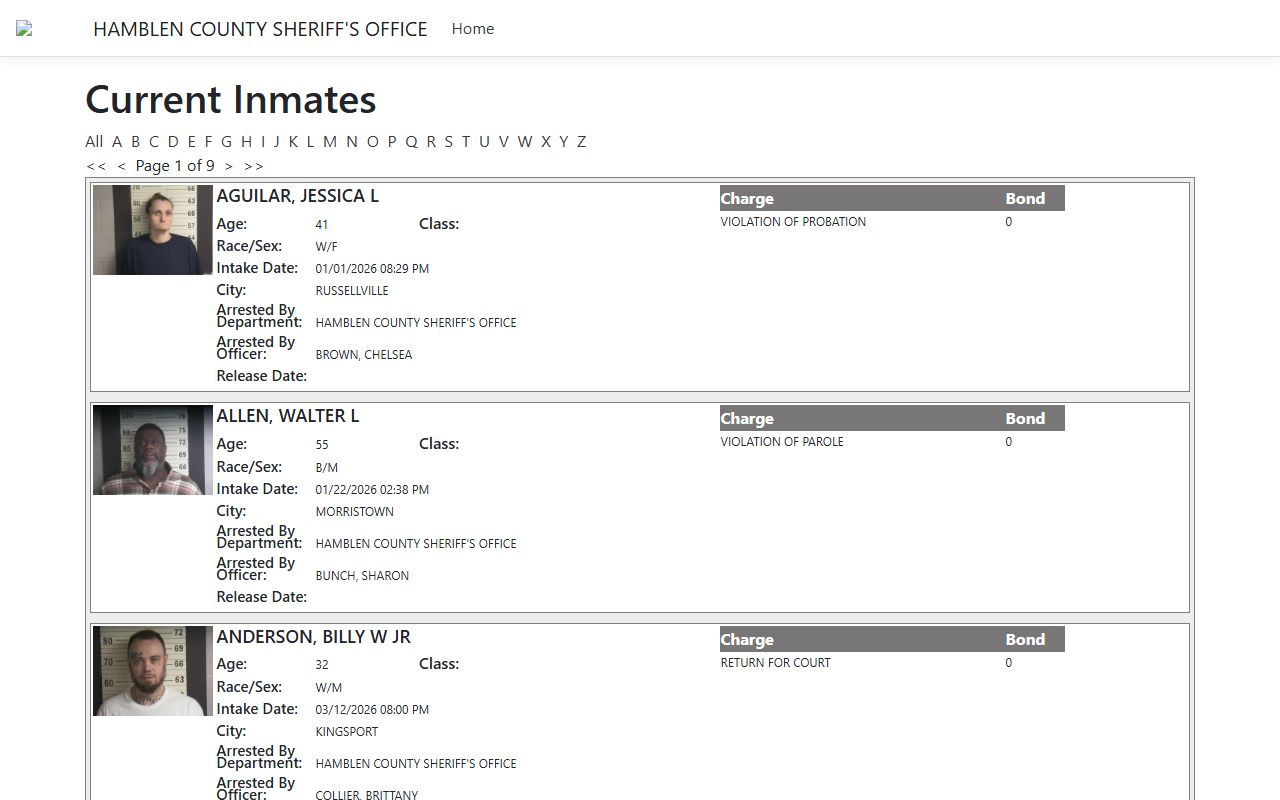
The county image gives the page a custody anchor. It does not replace the city arrest record, but it helps when you need a live county view with intake, release, and charge detail.
How to Search Morristown Recent Bookings
Start with the daily arrests page if you want the quickest city result. Morristown uses that page to show recent bookings and charges, so it is the closest public match to a fresh arrest. If you need more than a brief line, move to the police records page and use the incident report or accident report path. That keeps the search rooted in the office that created the file instead of a secondhand summary.
The city size helps explain why the police pages are central. The department serves a population of about 29,000 with 81 officers, so the public pages are built to show the most useful front-line record first. When you have only a name and a rough date, that city view is usually the fastest way to narrow the search before you move to court or county custody data.
If the arrest appears in the county portal, compare the city and county fields carefully. The Hamblen County view can show current inmates, the last 72 hours, the last 24 hours, a last-name search, age, race and sex, classification, intake date and time, city of residence, arresting department, arresting officer, release date, complete charge list, and bond amounts. Arresting agencies include Morristown Police Department, which makes the county portal a strong way to confirm that the city booking is the same person you are looking for.
Morristown Recent Bookings and Hamblen County
Hamblen County is the best custody fallback for Morristown Recent Bookings. The jail is at 510 Allison St, Morristown, TN 37814, and the main phone is 423-586-3781. That local connection makes it easier to move from a city arrest to a county custody check without leaving the same area of public record.
The county portal is especially helpful because it shows the details that matter most in a live booking search. It can display classification, intake date and time, the city of residence, the arresting department, the arresting officer, release date, and the full charge list with bond amounts. If the city page only tells you that a booking exists, the county view can tell you who arrested the person, when the intake happened, and whether the person is still held or has already been released.
Morristown Police Department appears as an arresting agency in the county data, so the county view is not separate from the city search. It is the same record trail at a different stage. That makes it the most practical backup when a Morristown booking needs to be confirmed with a live custody source.
Records and Court Requests in Morristown
The records division is the best starting point when you need a copy instead of a web summary. Because it provides incident reports and accident reports, it is the city office most likely to hold the actual file behind a Morristown arrest. If you need the report path for Morristown Recent Bookings, start there before you move to county or state tools.
The police department contact information also matters when you want to make sure you are asking the right office. The department is at 100 West 1st North Street, PO Box 1283, Morristown, TN 37816, and the main phone is 423-585-2710. For records follow-up, the Public Records Coordinator is at 511 W. 2nd North Street, Morristown, TN 37814, with phone 423-586-1931. Those contacts help when the public pages do not answer the question by themselves.
City Court handles the misdemeanor and traffic side of the record. That means a booking can begin at the police desk, move into the daily arrests view, and then show up again in court if the case continues. If you are trying to understand a Morristown booking from start to finish, those three city steps are often the clearest path.
Access and State Fallbacks
Access is broad, but it still depends on which office holds the file. The police department owns the arrest record, the records division handles the report copy path, City Court handles misdemeanor and traffic violations, and Hamblen County handles the custody side. That division of labor keeps the search clear and helps you ask the right office for the right record instead of guessing from a single web result.
If the local view is incomplete, Tennessee state tools can help. The criminal history page at tn.gov/tbi/criminal-history-records.html is the statewide adult history path, tn.gov/openrecords explains how to route a public records request, and the expungements page at tn.gov/courts/trial-courts/criminal-courts/expungements.html helps explain why a public result may be missing or limited. If you need a broader court pointer, tncrtinfo.com can help you compare a local booking with a filed case.
Morristown Recent Bookings are easiest to trust when you keep the city and county layers in order. Start with the police record, move to the report or court file if needed, and then use the county custody view if you still need confirmation.
Morristown Recent Bookings Summary
Morristown Recent Bookings are most reliable when you treat the police department, records division, daily arrests page, City Court, and Hamblen County portal as one chain. The city record starts the story. The daily arrests page gives you the quickest booking view. The records division supplies the report path. City Court shows the misdemeanor or traffic follow-up. Hamblen County confirms custody and booking detail.
That is the cleanest way to search Morristown because the city and county records do not all live in one place. Start with the office that created the file, then use the county page only when you need live custody detail or a stronger confirmation. If you want the county context page, use the button below.